Entering college is an exciting chapter, bringing new challenges, learning experiences, and the unique environment of dorm life. As you settle into your new space, often compact and shared, setting up a functional workstation is paramount. While your laptop is central, the often-overlooked computer mouse plays a pivotal role in navigating countless assignments, research papers, and even some well-deserved downtime with games or streaming. Choosing the right mouse for a college dorm isn’t just about functionality; it’s about finding a companion that enhances productivity, fits into limited space, minimizes distractions for roommates, and withstands the rigors of student life without breaking the bank. This guide, drawing on over a decade of expertise, aims to equip you with the knowledge to select the perfect computer mouse, tailored specifically for the dynamic demands of your college dorm room.
Understanding Computer Mice
A computer mouse is an indispensable peripheral that translates hand movements into cursor actions on a screen, offering precision and speed unmatched by touchpads. Its evolution has brought forth a diverse range of options, each with unique characteristics suitable for different needs.
Historically, mice used a rolling ball to track movement, but modern designs predominantly feature optical or laser sensors. Today, the primary categories you’ll encounter are wired and wireless, with further specialization into gaming and ergonomic models. Wired mice offer a direct connection, ensuring zero latency and eliminating battery concerns, ideal for stationary setups or competitive gaming. However, the cable can add clutter, a notable disadvantage in small dorm rooms. Wireless mice, conversely, provide unparalleled freedom of movement and a cleaner desk. They typically connect via a USB dongle (RF 2.4GHz) or Bluetooth, making them highly portable and versatile for students who frequently move between their desk, bed, or a campus library. The trade-off is the need for batteries, either replaceable or rechargeable, which requires mindful management. Gaming mice are engineered for speed, precision, and customization, often featuring high DPI, extra programmable buttons, and robust build quality, catering to students who game in their downtime. Ergonomic mice prioritize comfort, designed to fit the natural curve of the hand and wrist, crucial for preventing strain during extended study sessions.
Each type presents its own set of advantages and disadvantages. For a college dorm, the emphasis often shifts towards portability, wireless connectivity, and ergonomic comfort, with budget and quiet operation also being significant factors.
 College student in dorm room using a wireless computer mouse on a laptop
How to Choose the Right Computer Mouse for Dorm Life
Selecting the ideal computer mouse for your college dorm requires a thoughtful approach, balancing performance with practical considerations specific to student living.
Assess Your Usage Needs
|
Our Picks for the Best Computer mouse in 2026
As an Amazon Associate I earn from qualifying purchases.
|
||
| Num | Product | Action |
|---|---|---|
| 1 | Logitech M510 Wireless Mouse, 2.4 GHz with USB Unifying Receiver, 1000 DPI Laser-Grade Tracking, 7-Buttons, 24-Months Battery Life, PC/Mac/Laptop - Graphite |

|
| 2 | acer Wireless Mouse for Laptop, 2.4GHz Computer Mouse 3 Adjustable DPI Office Cordless USB Mice with USBA Receiver, 6 Buttons, 1600 DPI, Medium to Large Sized Hands Compatible with PC, Laptop, Desktop |
|
| 3 | Logitech M185 Wireless Mouse, 2.4GHz with USB Mini Receiver, 12-Month Battery Life, 1000 DPI Optical Tracking, Ambidextrous PC/Mac/Laptop - Swift Grey |
|
| 4 | Amazon Basics 3-Button USB Wired Mouse with Responsive Tracking, Plug & Play, Compatible with Windows and Mac, Black |
|
| 5 | TECKNET Ergonomic Mouse, Wireless Vertical Mouse, 4800 DPI, Rechargeable Bluetooth Mice for Carpal Tunnel Right Hand, 3-Device Connectivity for Laptop, PC, MacBook, Black |
|
| 6 | Wireless Bluetooth Mouse, Rechargeable, LED, Silent, Ultra-thin Design (Bluetooth 5.2 and 2.4GHz USB Receiver) | Portable Computer Mouse for Laptops, iPads, MacBooks and Apple Devices (Black) |
|
| 7 | Amazon Basics 2.4 Ghz Wireless Optical Computer Mouse with USB Nano Receiver, Black |
|
| 8 | Redragon M997 Magnesium Alloy Wireless Gaming Mouse, Tri-Mode BT & 2.4GHz, Ultra Lightweight Ergonomic Mouse, 1000Hz, Rechargeable for PC Laptop, Starlight Black |
|
| 9 | Logitech MX Master 4, Ergonomic Wireless Mouse with Advanced Performance Haptic Feedback, Ultra-Fast Scrolling, USB-C Charging, Bluetooth, Windows, MacOS - Graphite |
|
| 10 | Logitech B100 Wired Mouse for Computer and Laptop, USB Corded Mouse, Right or Left Hand Use - Black |
|
Before diving into specifications, consider how you’ll primarily use your mouse. Are you a humanities major mainly typing essays and browsing research? A design student needing precise control for graphic software? Or a gamer unwinding with competitive titles? Your primary activities will dictate the necessary features. Similarly, reflect on your daily usage: frequent, prolonged sessions warrant ergonomic designs and reliable connectivity. Finally, establish a budget. Mice range from basic, affordable models to premium, feature-rich devices, so knowing your financial limits will help narrow down choices.
Key Features to Consider
The details make all the difference in a dorm environment.
- DPI Sensitivity: DPI, or Dots Per Inch, measures how sensitive your mouse is to movement. A higher DPI means the cursor moves further with less physical hand movement. For general tasks like web browsing and document editing, a moderate DPI (around 800-1600) is usually sufficient. However, if you dabble in graphic design, video editing, or gaming, a mouse with adjustable DPI settings allows you to switch between high precision and rapid movement, significantly enhancing your experience.
- Ergonomics & Size: Comfort is king, especially during marathon study sessions. An ergonomic mouse fits naturally in your hand, supporting your wrist and fingers to prevent fatigue and discomfort. Consider your hand size and preferred grip style (palm, claw, fingertip). Compact mice are great for portability and small desks, but ensure it’s still comfortable for your hand. Many manufacturers offer different sizes and shapes, so trying a few models, if possible, can make a huge difference.
- Buttons: Most mice have at least two main buttons and a scroll wheel. For increased productivity, look for mice with additional programmable buttons. These can be assigned shortcuts for copying, pasting, opening applications, or navigating web pages, saving precious clicks and time.
- Connectivity: Wireless is highly recommended for dorm rooms to minimize cable clutter and enhance portability.
- RF (Radio Frequency) 2.4GHz: Uses a small USB dongle that plugs into your laptop. Offers a stable, low-latency connection.
- Bluetooth: Connects directly to your laptop’s built-in Bluetooth, freeing up a USB port. Ideal for multi-device setups (e.g., switching between a laptop and tablet). Some mice offer dual connectivity, combining both options for maximum flexibility.
- Sensor Technology: Optical sensors (using an LED light) and laser sensors (using a laser diode) are the two main types. Optical mice are generally excellent on most surfaces, while laser mice offer superior tracking on glossy or uneven surfaces, often with higher precision. For most dorm room scenarios, a good optical mouse will suffice.
- Battery Life (Wireless): This is a critical factor. Mice with long battery life (several months on replaceable AA/AAA batteries) reduce the hassle of frequent changes. Rechargeable mice, often using USB-C, are convenient as you can top them up overnight, though their battery life per charge might be shorter.
- Quiet Clicks: In a shared dorm, the constant clicking of a mouse can be incredibly disruptive. Opting for a mouse with “silent clicks” can be a lifesaver for maintaining harmony with roommates and for focused work in quiet study areas.
- Durability: Student life can be tough on electronics. Choose a mouse from a reputable brand known for durable products. A robust build quality means it can withstand being tossed into a backpack and daily use without falling apart.
Comparison of Popular Mouse Models for Students
Here’s a quick overview of some popular mouse models often recommended for students, highlighting their key features relevant to dorm living:
| Mouse Model | DPI Range | Type | Buttons | Connectivity | Ergonomics | Quiet Clicks | Price Range |
|---|---|---|---|---|---|---|---|
| Dell Pro Mouse – MS300 | Standard | Wireless | 3 | RF 2.4GHz | Full-size | No | Entry-level |
| Dell Pro Compact Silent – MS355 | Standard | Wireless | 3 | RF 2.4GHz/Bluetooth | Compact | Yes | Budget |
| Dell Bluetooth Travel – MS700 | Standard | Wireless | 3 | Bluetooth | Twistable/Compact | No | Mid-range |
| Logitech MX Anywhere Series | Adjustable | Wireless | 7 (programmable) | RF 2.4GHz/Bluetooth | Compact | Yes (some) | Premium |
| Logitech G305 LIGHTSPEED | Up to 12,000 | Wireless | 6 (programmable) | RF 2.4GHz | Ambidextrous | No | Mid-range |
| Logitech Lift Vertical Mouse | Adjustable | Wireless | 4 (programmable) | RF 2.4GHz/Bluetooth | Ergonomic Vertical | Yes | Premium |
| Razer Pro Click Mini | Up to 12,000 | Wireless | 7 (programmable) | RF 2.4GHz/Bluetooth | Compact | Yes | Premium |
Prices are approximate and can vary.
Top Picks: Best Computer Mice for College Dorm Rooms
Based on the critical factors for dorm life—portability, comfort, quiet operation, and connectivity—here are our top recommendations across different categories.
Best Overall: Logitech MX Anywhere Series
The Logitech MX Anywhere series (e.g., MX Anywhere 3S) consistently ranks high for its versatility and compact design, making it ideal for students. It offers excellent precision with a sensor that tracks on virtually any surface, from a polished desk to a bedsheet. Its quiet clicks are a major plus for shared spaces, and multi-device Bluetooth connectivity allows seamless switching between your laptop, tablet, and even a dorm desktop. The rechargeable battery provides weeks of power on a single charge, and its compact size makes it perfect for tossing into a backpack.
Best Budget-Friendly: Dell Pro Compact Silent Mouse – MS355
For students keeping a tight budget, the Dell Pro Compact Silent Mouse – MS355 offers exceptional value. It delivers smooth, precise performance with both RF 2.4GHz and Bluetooth connectivity. Its compact and ergonomic design fits comfortably in most hands, and critically for dorms, it boasts silent clicks. This mouse provides all the essential features for academic work and casual browsing without a hefty price tag, making it an excellent choice for everyday student use.
Best Ergonomic: Logitech Lift Vertical Mouse
Long hours of study can take a toll on your wrist. The Logitech Lift Vertical Mouse is designed to position your hand in a more natural “handshake” posture, reducing strain and promoting comfort. This ergonomic design is a game-changer for preventing repetitive strain injuries, allowing for longer, more comfortable work sessions. It features quiet clicks and multi-device connectivity, perfect for productivity in a dorm. While it might take a little getting used to, the long-term benefits for your wrist health are undeniable.
Best for Casual Gaming & Productivity: Logitech G305 LIGHTSPEED
If your college life includes both serious study and some casual gaming, the Logitech G305 LIGHTSPEED offers a fantastic balance. It’s a wireless gaming mouse renowned for its reliable LIGHTSPEED technology, providing a lag-free experience. With a high DPI HERO sensor, it delivers exceptional precision for gaming and detailed design work. Its compact, ambidextrous design is portable, though it uses a USB receiver and standard click sounds, so consider your roommates. It runs on a single AA battery with impressive longevity.
 A college student's desk in a dorm room with an ergonomic wireless computer mouse next to a laptop
Tips for Using and Maintaining Your College Dorm Mouse
A little care goes a long way in extending the life and performance of your computer mouse.
Regular cleaning is crucial. Dust, dirt, and skin oils can accumulate, especially around the sensor and scroll wheel, affecting performance. Use a soft, lint-free cloth lightly dampened with rubbing alcohol to wipe down the exterior. For the sensor, a cotton swab can gently clean any debris. If your mouse has a removable cover or battery compartment, periodically clean inside as well. For wireless mice, optimize settings by adjusting DPI to your preference for different tasks – lower for precision, higher for speed. Many mice come with software to customize button functions, which can greatly enhance workflow. To maximize battery life on wireless models, turn off the mouse when not in use, especially overnight or when packed away. For rechargeable mice, establish a charging routine. If you encounter connectivity issues, first try re-pairing your Bluetooth mouse or re-inserting the USB receiver for RF mice. A simple restart of your computer can also often resolve minor glitches.
Detailed Comparison: Mouse Technologies
Understanding the underlying technology can help you appreciate why certain mice perform differently.
Optical and laser sensors are the main players. Optical mice use an LED light to illuminate the surface and a small camera to capture images, detecting movement by analyzing changes in these images. They are excellent for most opaque surfaces. Laser mice, conversely, use an invisible laser beam, which allows them to track on a wider variety of surfaces, including glass and high-gloss finishes, often with greater precision and higher DPI capabilities. For most academic and dorm room tasks, a quality optical mouse is more than adequate. Gaming mice often feature advanced optical or laser sensors with extremely high, adjustable DPI and polling rates to capture every nuance of movement. Productivity mice, on the other hand, prioritize comfort, quiet operation, and multi-device connectivity, often with moderate DPI. Trackball mice, while less common, are a unique ergonomic option where the user moves a static ball with their thumb or fingers, keeping the hand stationary. This can be beneficial for those with wrist issues or very limited desk space, though they have a steeper learning curve.
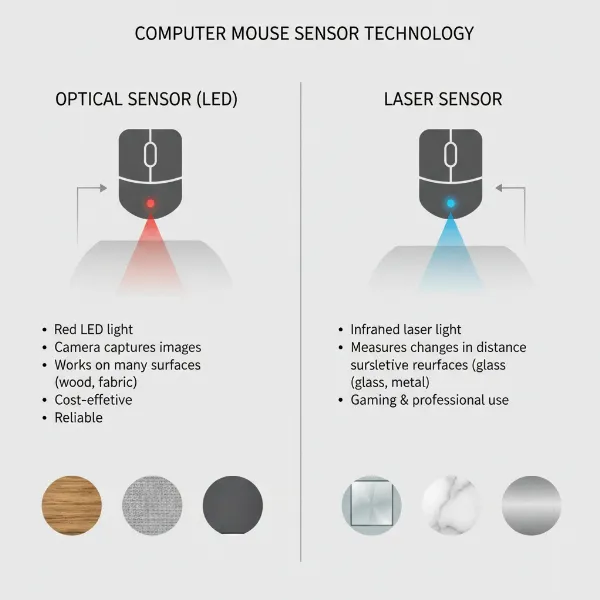 An infographic illustrating the differences between optical and laser computer mouse sensor technologies
Where to Buy Your Computer Mouse for College
Finding a reliable vendor is just as important as choosing the right mouse itself.
Major electronics retailers like Best Buy, Amazon, and directly from manufacturer websites such as Logitech, Dell, and Razer are excellent places to start. These stores typically offer a wide selection, competitive pricing, and often student discounts. When purchasing online, pay close attention to the retailer’s return policy and warranty information. Ensure that any third-party sellers on marketplaces like Amazon are reputable. Always check customer reviews, not just for the product but also for the seller, to gauge reliability. A good warranty can save you headaches and money if your mouse develops a fault during your college years. Physical stores offer the advantage of trying out different mice to assess ergonomics and feel, which is invaluable.
Buying Guide for Your College Dorm Computer Mouse
Navigating the myriad of options can be overwhelming, but a simple buying guide can streamline your decision.
Begin by setting a clear budget. Mice for students can range from $20 to over $100, and knowing your limit helps filter choices immediately. Next, consider trusted brands like Logitech, Dell, Razer, and Microsoft, which are known for quality and customer support. Finally, and perhaps most importantly, read reviews from other students or users with similar needs. Real-world feedback can highlight practical pros and cons not found in product descriptions.
“A versatile wireless mouse with long battery life and quiet clicks is the unsung hero of any productive dorm room.” – Dr. Emily Chen, Professor of Computer Science
Conclusion
Choosing the best computer mouse for your college dorm room is a small but impactful decision that can significantly enhance your academic journey and daily comfort. By prioritizing factors like ergonomics, portability, reliable wireless connectivity, long battery life, and crucially, quiet operation for shared living spaces, you can find a device that perfectly supports your unique student lifestyle. Whether you opt for a compact, feature-rich model like the Logitech MX Anywhere, a budget-friendly silent mouse from Dell, or an ergonomic vertical design, remember that the right tool can make hours of study or creative work feel much more comfortable and efficient. Take the time to consider your individual needs and invest in a mouse that will serve as a dependable partner throughout your college experience. What kind of computer mouse do you think would best support your college journey?
Frequently Asked Questions
What makes a computer mouse “dorm-friendly”?
A dorm-friendly computer mouse is typically wireless for portability and less clutter, compact to save space, ergonomic for comfort during long study sessions, and ideally features quiet clicks to avoid disturbing roommates.
Are wired or wireless mice better for college students?
Wireless mice are generally better for college students due to their superior portability, reduced cable clutter in small dorm rooms, and flexibility to work from different locations. However, wired mice offer consistent performance without battery concerns.
Is a high DPI mouse necessary for academic work?
For most academic tasks like document editing and web browsing, a high DPI mouse is not strictly necessary. A standard DPI range (800-1600) is usually sufficient. High DPI is more beneficial for precise tasks like graphic design or for gaming.
Can a gaming mouse be a good option for a college student?
Yes, a gaming mouse can be a good option for a college student, especially if they also enjoy gaming. They offer high precision, customizable buttons, and often good ergonomics, which can benefit both study and leisure activities.
How important are quiet clicks in a dorm room mouse?
Quiet clicks are highly important in a dorm room mouse to maintain a peaceful environment for yourself and your roommates. They minimize disruptive noise during late-night study sessions or when others are trying to sleep.